Our mailing list server, https://lists.torproject.org, is running an instance of Mailman.
The "listmaster" team is responsible for configuring all lists as required. They make decisions about which lists to create and which to retire, who should have owner or moderator access to existing lists, if lists are private, restricted, or public, and many other aspects of running mailing lists.
If you want to request a new list or propose a change to existing lists please file a ticket. If "listmaster" approves, they will coordinate with the admin team to have the list added and then configure it as needed. Don't forget to update the list of mailing lists (below) upon changes.
[[TOC]]
Tutorial
What are our most important lists?
New to Tor? If so then welcome! Our most important lists are as follows...
- tor-dev@ - Discussion list for developers, researchers, and other technical discussions.
- tor-relays@ - Discussion list for relay operators.
- tor-project@ - Discussion list for tor contributors. Only active and past tor contributors can post to this list.
For general discussion and user questions, tor-talk@ was used in the past, but it has been retired and replaced by the Tor Project users forum.
How do I get permission to post to tor-project@
Just ask. Anyone is allowed to watch, but posting is restricted to those that actively want to make Tor better. As long as you're willing to keep your posts constructive just contact Damian.
Note that unlike many of our lists this one is pretty actively moderated, so unconstructive comments may lose you posting permissions. Sorry about that, but this is one list we're striving to keep the noise down on. ;)
How do I ask for a new mailing list?
Creating a new list is easy, but please only request one if you have a good reason. Unused lists will periodically be removed to cut down on bloat. With that out of the way, to request a new list simply file a ticket with the following...
- What is the list name?
- What is the email address of the list maintainer? This person will be given the list's Mailman administrator access, be notified of bounces, and emails to the list owner. If this is a closed list then they'll be responsible for maintaining the membership.
- What is a one sentence description of the list? (see lists.torproject.org for examples)
Lists default to being public and archived. If you would prefer something else then you'll need to change its configuration in Mailman.
Creating lists involves at least two people, so please be patient while your list is being created. Be sure to regularly check the ticket you created for questions by list admins.
Members of tor-internal@ do not require approval for their lists. Non-members will need sign-off of Damian or qbi.
Why do we have internal lists?
In additional to our public email lists Tor maintains a handful of communication channels reserved for core contributors. This is not a secret inner cabal, but rather community members (both paid and unpaid) who have been long-time contributors with the project. (See our Core Contributor Guidelines.)
Why do we have these internal discussions? Funding proposals, trip reports, and other things sometimes include details that shouldn't be public. In general though we strongly encourage discussions to happen in public instead.
Note that this is a living document. Policies are not set in stone, and might change if we find something better.
How do I get added to internal lists?
Internal communication channels are open only to core contributors. For information on becoming a core contributor, see the Core Contributor Guidelines.
Mailman 3 migration FAQ
My moderator / admin password doesn't work
See below.
How do I regain access to my mailing list?
One major difference between Mailman 2 and Mailman 3 is that "list passwords" are gone. In Mailman 2, each mailing list has two passwords: a moderator and admin passwords, stored in cleartext and shared among moderators (and laboriously maintained in the TPA password manager).
Mailman 3 cleans all that up: each user now has a normal account, global to the entire site and common across lists, associated with their email account.
If you were a moderator or admin on a mailing list, simply sign up for an account and you should be able to access the list moderation facilities. See also the upstream FAQ about this and the architecture page.
Note that for site-wide administration, there's a different "superuser" concept in the web interface. For this, you need to make a new account just like during the first install, with:
django-admin createsuperuser --pythonpath /usr/share/mailman3-web --settings settings --username USER-admin --email USER+admin@torproject.org
The USER-admin account must not already exist.
What changed?
Mailman 3 is a major upgrade from Mailman 2 and essentially a rewrite. While some concepts (like "invitations", "moderators" and "archives") remain, the entire user interface, archiver, and mail processors were rebuild from scratch.
This implies that things are radically different. The list member manual should help you find your way around the interface.
Why upgrade?
We upgraded to Mailman 3 because Mailman 2 is unsupported upstream and the Debian machine hosting it was running an unsupported version of Debian for this reason. See TPA-RFC-71 for more background. The upstream upgrade guide also has some reasoning.
Password resets do not work
If you can't reset your password to access your list, make sure that you actually have a Mailman 3 account. Those don't get migrated automatically, see How do I regain access to my mailing list? or simply try to sign up for an account as if you were a new user (but with your normal email address).
How-to
Create a list
A list can be created by running mailman-wrapper create on the mailing list server
(currently lists-01):
ssh lists-01.torproject.org mailman-wrapper create LISTNAME
If you do not have root access, proceed with the mailman admin password on the list creation form, which is, however, only accessible to Mailman administrators. This also allows you to pick a different style for the new list, something which is not available from the commandline before Mailman 3.3.10.
Mailman creates the list name with an upper case letter. Usually people like all lower-case more. So log in to the newly created list at https://lists.torproject.org/ and change the list name and the subject line to lower case.
If people want to have specific settings (no archive, no public listing, etc.), can you set them also at this stage.
Be careful that new mailing lists do not have the proper DMARC mitigations set, which will make deliverability problematic. To workaround this, run this mitigation in a shell:
ssh lists-01.torproject.org mailman-wrapper shell -l LISTNAME -r tpa.mm3_tweaks.default_policy
This is tracked in issue 41853.
Note that we don't keep track of the list of mailing lists. If a list needs to be publicly listed, it can be configured as such in Mailman, while keeping the archives private.
Disable a list
- Remove owners and add
devnull@torproject.orgas owner - In Settings, Message Acceptance: set all emails to be rejected (both member and non-member)
- Add
^.*@.*to the ban list - Add to description that this mailing list is disabled like
[Disabled]or[Archived]
This procedure is derived from the Wikimedia Foundation procedure. Note that upstream does not seem to have a procedure for this yet, so this is actually a workaround.
Remove a list
WARNING: do not follow this procedure unless you're absolutely sure you want to entirely destroy a list. This is likely NOT what you want, see disable a list instead.
To remove a list, use the mailman-wrapper remove command. Be careful
because this removes the list without confirmation! This includes
mailing lists archives!
ssh lists-01.torproject.org mailman-wrapper remove LISTNAME
Note that we don't keep track of the list of mailing lists. If a list needs to be publicly listed, it can be configured as such in Mailman, while keeping the archives private.
Changing list settings from the CLI
The shell subcommand is the equivalent of the old withlit
command. By calling:
mailman-wrapper shell -l LISTNAME
... you end up in a Python interpreter with the mlist object
accessible for modification.
Note, in particular, how the list creation procedure uses this to modify the list settings on creation.
Handling PII redaction requests
Below are instructions for handling a request for redaction of personally-identifying information (PII) from the mail archive.
The first step is to ensure that the request is lawful and that the requester is the true "owner" of the PII involved in the request. For an email address, send an email containing with a random string to the requester to prove that they control the email address.
Secondly, the redaction request must be precise and not overly broad. For example, redacting all instances of "Joe" from the mail archives would not be acceptable.
Once all that is established, the actual redaction can proceed.
If the requests is limited to one or few messages, then the first compliance option would be to simply delete the messages from the archives. This can be done using an admin account directly from the web interface.
If the request involves many messages, then a "surgical" redaction is preferred in order to reduce the collateral damage on the mail archive as a whole. We must keep in mind that these archives are useful sources of information and that widespread deletion of messages is susceptible to harm research and support around the Tor Project.
Such "surgical" redaction is done using SQL statements against the mailman3
database directly, as mailman doesn't offer any similar compliance mechanism.
In this example, we'll pretend to handle a request to redact the name "Foo Bar" and an associated email address, "foo@bar.com":
-
Login to
lists-01, runsudo -u postgres psqland\c mailman3 -
Backup the affected database rows to temporary tables:
CREATE TEMP TABLE hyperkitty_attachment_redact AS
SELECT * FROM hyperkitty_attachment
    WHERE
        content_type = 'text/html'
        and email_id IN
            (SELECT id FROM hyperkitty_email
            WHERE content LIKE '%Foo Bar%'
           OR content LIKE '%foo@bar.com%');

CREATE TEMP TABLE hyperkitty_email_redact AS
  SELECT * from hyperkitty_email
  WHERE content LIKE '%Foo Bar%'
  OR content LIKE '%foo@bar.com.com%';

CREATE TEMP TABLE hyperkitty_sender_redact AS
  SELECT * from hyperkitty_sender
  WHERE address = 'foo@bar.com';

CREATE TEMP TABLE address_redact AS
  SELECT * FROM address
  WHERE display_name = 'Foo Bar'
  OR email = 'foo@bar.com';

CREATE TEMP TABLE user_redact AS
      SELECT * from "user"
  WHERE display_name = 'Foo Bar';
-
Run the actual modifications inside a transaction:
BEGIN; -- hyperkitty_attachment -- -- redact the name and email in html attachments -- (only if found in plaintext email) UPDATE hyperkitty_attachment SET content = convert_to( replace( convert_from(content, 'UTF8'), 'Foo Bar', '[REDACTED]' ), 'UTF8') WHERE content_type = 'text/html' AND email_id IN (SELECT id FROM hyperkitty_email WHERE content LIKE '%Foo Bar%'); UPDATE hyperkitty_attachment SET content = convert_to( replace( convert_from(content, 'UTF8'), 'foo@bar.com', '[REDACTED]' ), 'UTF8') WHERE content_type = 'text/html' AND email_id IN (SELECT id FROM hyperkitty_email WHERE content LIKE '%foo@bar.com%'); -- --- hyperkitty_email --- -- redact the name and email in plaintext emails UPDATE hyperkitty_email SET content = REPLACE(content, 'Foo Bar <foo@bar.com>', '[REDACTED]') WHERE content LIKE '%Foo Bar <foo@bar.com>%'; UPDATE hyperkitty_email SET content = REPLACE(content, 'Foo Bar', '[REDACTED]') WHERE content LIKE '%Foo Bar%'; UPDATE hyperkitty_email SET content = REPLACE(content, 'foo@bar.com', '[REDACTED]') WHERE content LIKE '%foo@bar.com%'; UPDATE hyperkitty_email -- done SET sender_name = '[REDACTED]' WHERE sender_name = 'Foo Bar'; -- obfuscate the sender_id, must be unique -- combines the two updates to satisfy foreign key constraints: WITH sender AS ( UPDATE hyperkitty_sender SET address = encode(sha256(address::bytea), 'hex') WHERE address = 'foo@bar.com' RETURNING address ) UPDATE hyperkitty_email SET sender_id = encode(sha256(sender_id::bytea), 'hex') WHERE sender_id = 'foo@bar.com'; -- address -- -- redact the name and email -- email must match the identifier used in hyperkitty_sender.address UPDATE address -- done SET display_name = '[REDACTED]' WHERE display_name = 'Foo Bar'; UPDATE address -- done SET email = encode(sha256(email::bytea), 'hex') WHERE email = 'foo@bar.com'; -- user -- -- redact the name -- use double quotes around the table name -- redact display_name in user table UPDATE "user" SET display_name = '[REDACTED]' WHERE display_name = 'Foo Bar'; -
Look around the modified tables, do
COMMIT;if all good, otherwiseROLLBACK; -
Ending the
psqlsession discards the temporary tables, so keep it open -
Look at the archives if everything is ok
-
End the
psqlsession
To rollback changes after the transaction has been committed to the database, using the temporary tables:
UPDATE hyperkitty_attachment hka
        SET content = hkar.content
        FROM hyperkitty_attachment_redact hkar WHERE hka.id = hkar.id;

UPDATE hyperkitty_email hke
        SET content = hker.content,
            sender_id = hker.sender_id,
            sender_name = hker.sender_name
        FROM hyperkitty_email_redact hker WHERE hke.id = hker.id;

UPDATE hyperkitty_sender hks
        SET address = hksr.address
        FROM hyperkitty_sender_redact hksr WHERE hks.mailman_id = hksr.mailman_id;

UPDATE address a
        SET email = ar.email,
            display_name = ar.display_name
        FROM address_redact ar WHERE a.id = ar.id;

UPDATE "user" u
        SET display_name = ur.display_name
        FROM user_redact ur WHERE u.id = ur.id;
The next time such a request occur, it might be best to deploy the above formula as a simple "noop" Fabric task.
TODO Pager playbook
Disaster recovery
Data loss
If a server is destroyed or its data partly destroyed, it should be able to recover on-disk files through the normal backup system, with a RTO of about 24h.
Puppet should be able to rebuild a mostly functional Mailman 3 base install, although it might trip upon the PostgreSQL configuration. If that's the case, first try by flipping PostgreSQL off in the Puppet configuration, bootstrap, then run it again with the flip on.
Reference
Installation
NOTE: this section refers to the Mailman 3 installation. Mailman 2's installation was lost in the mists of time.
We currently manage Mailman through the profile::mailman Puppet
class, as the forge modules (thias/mailman and
nwaller/mailman) are both only for Mailman 2.
At first we were relying purely on the Debian package to setup databases, but this kind of broke apart. The profile originally setup the server with a SQLite database, but now it installs PostgreSQL and a matching user. It also configures the Mailman server to use those, which breaks the Puppet run.
To workaround that, the configuration of that database user needs to be redone by hand after Puppet runs:
apt purge mailman3 mailman3-web
rm -rf /var/spool/postfix/mailman3/data /var/lib/mailman3/web/mailman3web.db
apt install mailman3-full
The database password can be found in Trocla, on the Puppet server, with:
trocla get profile::mailman::postgresql_password plain
Note that the mailman3-web configuration is particularly
tricky. Even though Puppet configures Mailman to connect over
127.0.0.1, you must choose the ident method to connect to
PostgreSQL in the debconf prompts, otherwise dbconfig-common will
fail to populate the database. Once this dance is completed, run
Puppet again to propagate the passwords:
pat
The frontend database needs to be rebuilt with:
sudo -u www-data /usr/share/mailman3-web/manage.py migrate
See also the database documentation.
A site admin password was created by hand with:
django-admin createsuperuser --pythonpath /usr/share/mailman3-web --settings settings --username admin --email postmaster@torproject.org
And stored in the TPA password manager in
services/lists.torproject.org. Note that the above command yields
the following warnings before the password prompt:
root@lists-01:/etc/mailman3# django-admin createsuperuser --pythonpath /usr/share/mailman3-web --settings settings --username admin --email postmaster@torproject.org
/usr/lib/python3/dist-packages/django_q/conf.py:139: UserWarning: Retry and timeout are misconfigured. Set retry larger than timeout,
        failure to do so will cause the tasks to be retriggered before completion.
        See https://django-q.readthedocs.io/en/latest/configure.html#retry for details.
  warn(
System check identified some issues:

WARNINGS:
django_mailman3.MailDomain: (models.W042) Auto-created primary key used when not defining a primary key type, by default 'django.db.models.AutoField'.
        HINT: Configure the DEFAULT_AUTO_FIELD setting or the DjangoMailman3Config.default_auto_field attribute to point to a subclass of AutoField, e.g. 'django.db.models.BigAutoField'.
django_mailman3.Profile: (models.W042) Auto-created primary key used when not defining a primary key type, by default 'django.db.models.AutoField'.
        HINT: Configure the DEFAULT_AUTO_FIELD setting or the DjangoMailman3Config.default_auto_field attribute to point to a subclass of AutoField, e.g. 'django.db.models.BigAutoField'.
hyperkitty.Attachment: (models.W042) Auto-created primary key used when not defining a primary key type, by default 'django.db.models.AutoField'.
        HINT: Configure the DEFAULT_AUTO_FIELD setting or the HyperKittyConfig.default_auto_field attribute to point to a subclass of AutoField, e.g. 'django.db.models.BigAutoField'.
hyperkitty.Email: (models.W042) Auto-created primary key used when not defining a primary key type, by default 'django.db.models.AutoField'.
        HINT: Configure the DEFAULT_AUTO_FIELD setting or the HyperKittyConfig.default_auto_field attribute to point to a subclass of AutoField, e.g. 'django.db.models.BigAutoField'.
hyperkitty.Favorite: (models.W042) Auto-created primary key used when not defining a primary key type, by default 'django.db.models.AutoField'.
        HINT: Configure the DEFAULT_AUTO_FIELD setting or the HyperKittyConfig.default_auto_field attribute to point to a subclass of AutoField, e.g. 'django.db.models.BigAutoField'.
hyperkitty.LastView: (models.W042) Auto-created primary key used when not defining a primary key type, by default 'django.db.models.AutoField'.
        HINT: Configure the DEFAULT_AUTO_FIELD setting or the HyperKittyConfig.default_auto_field attribute to point to a subclass of AutoField, e.g. 'django.db.models.BigAutoField'.
hyperkitty.MailingList: (models.W042) Auto-created primary key used when not defining a primary key type, by default 'django.db.models.AutoField'.
        HINT: Configure the DEFAULT_AUTO_FIELD setting or the HyperKittyConfig.default_auto_field attribute to point to a subclass of AutoField, e.g. 'django.db.models.BigAutoField'.
hyperkitty.Profile: (models.W042) Auto-created primary key used when not defining a primary key type, by default 'django.db.models.AutoField'.
        HINT: Configure the DEFAULT_AUTO_FIELD setting or the HyperKittyConfig.default_auto_field attribute to point to a subclass of AutoField, e.g. 'django.db.models.BigAutoField'.
hyperkitty.Tag: (models.W042) Auto-created primary key used when not defining a primary key type, by default 'django.db.models.AutoField'.
        HINT: Configure the DEFAULT_AUTO_FIELD setting or the HyperKittyConfig.default_auto_field attribute to point to a subclass of AutoField, e.g. 'django.db.models.BigAutoField'.
hyperkitty.Tagging: (models.W042) Auto-created primary key used when not defining a primary key type, by default 'django.db.models.AutoField'.
        HINT: Configure the DEFAULT_AUTO_FIELD setting or the HyperKittyConfig.default_auto_field attribute to point to a subclass of AutoField, e.g. 'django.db.models.BigAutoField'.
hyperkitty.Thread: (models.W042) Auto-created primary key used when not defining a primary key type, by default 'django.db.models.AutoField'.
        HINT: Configure the DEFAULT_AUTO_FIELD setting or the HyperKittyConfig.default_auto_field attribute to point to a subclass of AutoField, e.g. 'django.db.models.BigAutoField'.
hyperkitty.ThreadCategory: (models.W042) Auto-created primary key used when not defining a primary key type, by default 'django.db.models.AutoField'.
        HINT: Configure the DEFAULT_AUTO_FIELD setting or the HyperKittyConfig.default_auto_field attribute to point to a subclass of AutoField, e.g. 'django.db.models.BigAutoField'.
hyperkitty.Vote: (models.W042) Auto-created primary key used when not defining a primary key type, by default 'django.db.models.AutoField'.
        HINT: Configure the DEFAULT_AUTO_FIELD setting or the HyperKittyConfig.default_auto_field attribute to point to a subclass of AutoField, e.g. 'django.db.models.BigAutoField'.
postorius.EmailTemplate: (models.W042) Auto-created primary key used when not defining a primary key type, by default 'django.db.models.AutoField'.
        HINT: Configure the DEFAULT_AUTO_FIELD setting or the PostoriusConfig.default_auto_field attribute to point to a subclass of AutoField, e.g. 'django.db.models.BigAutoField'.
Those are an instance of a bug specific to bookworm, since then fixed
upstream and in trixie, see 1082541.
The default example.com host was modified by going into the django
admin interface, then the lists-01.torproject.org "domain" was
added in the domains list and the test list was created, all
through the web interface.
Eventually, the lists.torproject.org "domain" was added to the
domains list as well, after first trying torproject.org as a domain
name, which led to incorrect Archived-At headers.
Upgrades
Besides the package upgrade, some port-upgrade commands need to be run manually to handle the database schema upgrade and static files.
The Wikimedia foundation guide has instructions that are informative, but not usable as-is in our environment.
Database schema
Static files
After upgrading the package, run this command to refresh the static files:
sudo -u www-data /usr/share/mailman3-web/manage.py collectstatic --noinput --clear --verbosity 1
SLA
There's no SLA specifically associated with this service.
Design and architecture
Mailman 3 has a relatively more complex architecture than Mailman 2. The upstream architecture page does a good job at explaining it, but essentially there is:
- a REST API server ("mailman-core")
- a Django web frontend ("Postorius")
- a archiver ("Hyperkitty", meow)
- a mail and web server
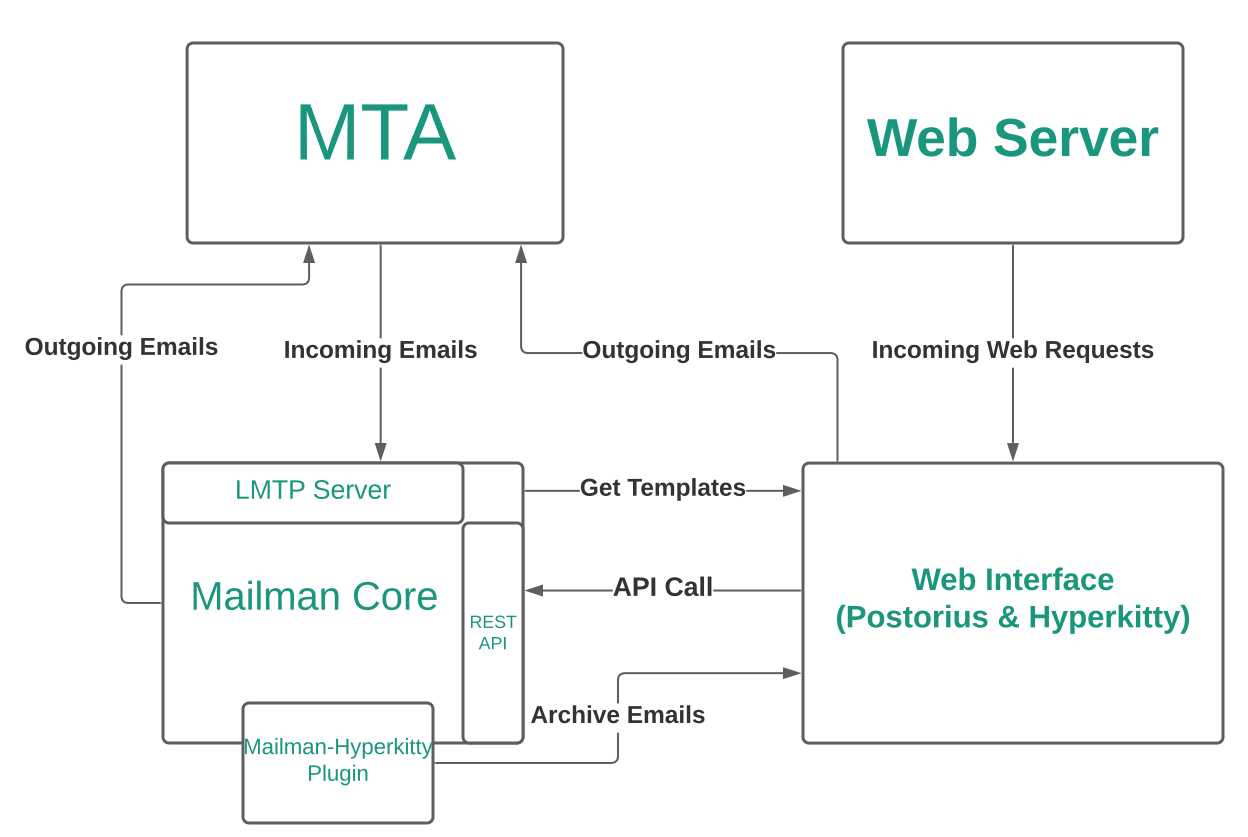
In our email architecture, the mailing list server (lists-01) only
handles mailman lists. It receives mail on lists.torproject.org,
stores it in archives (or not), logs things, normally rewrites the
email and broadcasts it to a list of email addresses, which Postfix
(on lists-01) routes to the wider internet, including other
torproject.org machines.
Services
As mentioned in the architecture, Mailman is made of different components who communicate over HTTP, typically. Cron jobs handle indexing lists for searching.
All configuration files reside in /etc/mailman3, although the
mailman3-web.py configuration file has its defaults in
/usr/share/mailman3-web/settings.py. Note that this configuration is
actually a Django configuration file, see also the upstream Django primer.
The REST API server configuration can be dumped with mailman-wrapper
conf, but be careful as it outputs cleartext passwords.
Storage
Most data is stored in a PostgreSQL database, apart from bounces
which somehow seem to exist in Python pickle files in
/var/lib/mailman3/queue/bounces.
A list of addresses is stored in /var/spool/postfix/mailman3 for
Postfix to know about mailing lists. There's the trace of a SQLite
database there, but it is believed to be stale.
Search engine
The search engine shipped with Mailman is built with Django-Haystack, whose default backend is Whoosh.
In February 2025, we've experimented with switching to Xapian,
through the Xapian Haystack plugin instead because of severe
performance problems that were attributed to search
(tpo/tpa/team#41957). This involved changing the configuration
(see puppet-control@f9b0206ff) and rebuilding the index with the
update_index command:
date; time sudo -u www-data nice ionice -c 3 /usr/share/mailman3-web/manage.py update_index ; date
Note how we wrap the call in time(1) (to track resource usage),
date(1) (to track run time), nice(1) and ionice(1) (to reduce server
load). This works because the Xapian index was empty: to rebuild the
index from scratch, we'd need the rebuild_index command.
This also involved patching the python3-xapian-haystack package,
as it would otherwise crash (Hyperkitty issue 408). We used a variation of upstream PR
181.
The index for a single mailing list can be rebuilt with:
sudo -u www-data /usr/share/mailman3-web/manage.py update_index_one_list test@lists.torproject.org
For large lists, a similar approach to the larger indexing should be used.
Queues
Mailman seems to store Python objects of in-flight emails (like
bounces to retry) in /var/lib/mailman3/queue.
TODO REMOVE THE "List of mailing lists"
Note that we don't keep track of the list of mailing lists. If a list needs to be publicly listed, it can be configured as such in Mailman, while keeping the archives private.
This list is therefore only kept for historical reference, and might be removed in the future.
The list of mailing lists should be visible at https://lists.torproject.org/.
Discussion Lists
The following are lists with subscriber generated threads.
| List | Maintainer | Type | Description |
|---|---|---|---|
| tor-project | arma, atagar, gamambel | Public | Moderated discussion list for active contributors. |
| tor-dev | teor, pili, phw, sysrqb, gaba | Public | Development related discussion list. |
| tor-onions | teor, dgoulet, asn, pili, phw, sysrqb, gaba | Public | technical discussion about running Tor onion (hidden) services |
| tor-relays | teor, pili, phw, sysrqb, gaba | Public | Relay operation support. |
| tor-relays-universities | arma, qbi, nickm | Public | Relay operation related to universities (lightly used). |
| tor-mirrors | arma, qbi, nickm | Public | Tor website mirror support. |
| tor-teachers | mrphs | Public | Discussion, curriculum sharing, and strategizing for people who teach Tor around the world. |
| tor-team | arma, atagar, qbi, nickm | Private | Internal discussion list (externally reachable). |
| tor-internal | arma, atagar, qbi, nickm | Private | Internal discussion list. |
| onion-advisors | isabela | Private | |
| onionspace-berlin | infinity0, juris, moritz | Private | Discussion list for Onionspace, a hackerspace/office for Tor-affiliated and privacy tools hackers in Berlin. |
| onionspace-seattle | Jon | Private | Discussion list for the Tor-affiliated and privacy tools hackers in Seattle |
| global-south | sukhbir, arma, qbi, nickm, gus | Public | Tor in the Global South |
Notification Lists
The following lists are generally read-only for their subscribers. Traffic is either notifications on specific topics or auto-generated.
| List | Maintainer | Type | Description |
|---|---|---|---|
| anti-censorship-alerts | phw, cohosh | Public | Notification list for anti-censorship service alerts. |
| metrics-alerts | irl | Public | Notification list for Tor Metrics service-related alerts |
| regional-nyc | sysrqb | Public | NYC-area Announcement List |
| tor-announce | nickm, weasel | Public | Announcement of new Tor releases. Here is an RSS feed. |
| tbb-bugs | boklm, sysrqb, brade | Public | Tor Browser Bundle related bugs. |
| tbb-commits | boklm, sysrqb, brade | Public | Tor Browser Bundle related commits to Tor repositories. |
| tor-bugs | arma, atagar, qbi, nickm | Public | Tor bug tracker. |
| tor-commits | nickm, weasel | Public | Commits to Tor repositories. |
| tor-network-alerts | dgoulet | Private | auto: Alerts related to bad relays detection. |
| tor-wiki-changes | nickm, weasel | Public | Changes to the Trac wiki. |
| tor-consensus-health | arma, atagar, qbi, nickm | Public | Alarms for the present status of the Tor network. |
| tor-censorship-events | arma, qbi, nickm | Public | Alarms for if the number of users from a local disappear. |
| ooni-bugs | andz, art | Public | OONI related bugs status mails |
| tor-svninternal | arma, qbi, nickm | Private | Commits to the internal SVN. |
Administrative Lists
The following are private lists with a narrowly defined purpose. Most have a very small membership.
| List | Maintainer | Type | Description |
|---|---|---|---|
| tor-security | dgoulet | Private | For reporting security issues in Tor projects or infrastructure. To get the gpg key for the list, contact tor-security-sendkey@lists.torproject.org or get it from pool.sks-keyservers.net. Key fingerprint = 8B90 4624 C5A2 8654 E453 9BC2 E135 A8B4 1A7B F184 |
| bad-relays | dgoulet | Private | Discussions about malicious and misconfigured Tor relays. |
| board-executive | isabela | Private | |
| board-finance | isabela | Private | |
| board-legal | isabela | Private | |
| board-marketing | isabela | Private | |
| meeting-planners | jon, alison | Public | The list for planning the bi-annual Tor Meeting |
| membership-advisors | atagar | Private | Council advisors on list membership. |
| tor-access | mikeperry | Private | Discussion about improving the ability of Tor users to access Cloudflare and other CDN content/sites |
| tor-employees | erin | Private | Tor employees |
| tor-alums | erin | Private | To support former employees, contractors, and interns in sharing job opportunities |
| tor-board | julius | Private | Tor project board of directors |
| tor-boardmembers-only | julius | Private | Discussions amongst strictly members of the board of directors, not including officers (Executive Director, President, Vice President and possibly more). |
| tor-community-team | alison | Public | Community team list |
| tor-packagers | atagar | Public | Platform specific package maintainers (debs, rpms, etc). |
| tor-research-safety | arma | Private | Discussion list for the Tor research safety board |
| tor-scaling | arma, nickm, qbi, gaba | Private | Internal discussion list for performance metrics, roadmap on scaling and funding proposals. |
| tor-test-network | dgoulet | Private | Discussion regarding the Tor test network |
| translation-admin | sysrqb | Private | Translations administration group list |
| wtf | nickm, sysrqb, qbi | Private | a wise tech forum for warm tech fuzzies |
| eng-leads | micah | Private | Tor leads of engineering |
Team Lists
Lists related to subteams within Tor.
| List | Maintainer | Type | Description |
|---|---|---|---|
| anti-censorship-team | arma, qbi, nickm, phw | Public | Anti-censorship team discussion list. |
| dir-auth | arma, atagar, qbi, nickm | Private | Directory authority operators. |
| dei | TPA | Public | Diversity, equity, & inclusion committee |
| www-team | arma, qbi, nickm | Public | Website development. |
| tbb-dev | boklm, sysrqb, brade | Public | Tor Browser development discussion list. |
| tor-gsoc | arma, qbi, nickm | Private | Google Summer of Code students. |
| tor-qa | boklm, sysrqb, brade | Public | QA and testing, primarily for TBB. |
| ooni-talk | hellais | Public | Ooni-probe general discussion list. |
| ooni-dev | hellais | Public | Ooni-probe development discussion list. |
| ooni-operators | hellais | Public | OONI mailing list for probe operators. |
| network-health | arma, dgoulet, gk | Public | Tor Network Health Team coordination list |
| tor-l10n | arma, nickm, qbi, emmapeel | Public | reporting errors on translations |
| tor-meeting | arma | Private | dev. meetings of the Tor Project. |
| tor-operations | smith | Private | Operations team coordination list |
| tpa-team | TPA | Private | TPA team coordination list |
Internal Lists
We have three email lists (tor-team@, tor-internal@, and bad-relays@), and a private IRC channel on OFTC.
- tor-team@ is an invite-only list that is reachable by the outside world. As such it both used for email CCs, and receives quite a bit of spam.
- tor-internal@ is an invite-only list that is not reachable by the outside world. Some individuals that are especially adverse to spam only subscribe to this one.
- bad-relays@ is an invite-only list that is reachable by the outside world. It is also used for email CCs.
- Our internal IRC channel is used for unofficial real time internal communication.
Encrypted Mailing Lists
We have mailing lists handled by Schleuder that we use within different teams.
- tor-security@ is an encrypted list. See its entry under "Administrative Lists".
- tor-community-council@ is used by Community Council members. Anyone can use it to email the community council.
See schleuder for more information on that service.
Interfaces
Mailman 3 has multiple interfaces and entry points, it's actually quite confusing.
REST API
The core of the server is a REST API server with a documented API but operating this is not exactly practical.
CLI
In practice, most interactions with the API can be more usefully done
by using the mailman-wrapper command, with one of the documented
commands.
Note that the documentation around those commands is particularly confusing because it's written in Python instead of shell. Once you understand how it works, however, it's relatively simple to figure out what it means. Take this example:
command('mailman addmembers --help')
This is equivalent to the shell command:
mailman addmembers --help
A more complicated example requires (humanely) parsing Python, like in this example:
command('mailman addmembers ' + filename + ' bee.example.com')
... that actually means this shell command:
mailman addmembers $filename bee.example.com
... where $filename is a text file with a members list.
Web (Postorius)
The web interface to the Mailman REST API is a Django program called "Postorious". It features the usual clicky interface one would expect from a website and, contrary to Mailman 2, has a centralized user database, so that you have a single username and password for all lists.
That user database, however, is unique to the web frontend, and cannot be used to operate the API, rather confusingly.
Authentication
Mailman has its own authentication database, isolated from all the others. Ideally it would reuse LDAP, and it might be possible to hook it to GitLab's OIDC provider.
Implementation
Mailman 3 is one of the flagship projects implemented in Python 3. The web interface is built on top of Django, while the REST API is built on top of Zope.
Debian ships Mailman 3.3.8, a little behind the latest upstream 3.3.10, released in October 2024.
Mailman 3 is GPLv3.
Related services
Mailman requires the proper operation of a PostgreSQL server and functioning email.
It also relates to the forum insofar as the forum mirrors some of the mailing lists.
Issues
There is no issue tracker specifically for this project, File or search for issues in the team issue tracker with the label ~Lists.
Known issues
- DMARC mitigations are not enabled by default and require manual modification after a list is created, the fix for this seems to be to create a plugin, see issue #41853
- Templates cannot be edited from the web interface, see #41855
- Cannot disable signups on lists
- Xapian search engine uses up too much disk space
- Mailman runs out of memory, mitigated by the switch to Xapian which brought this from dozens of times per week to a couple times per week
Maintainer
The original deployment of Mailman was lost to history.
Anarcat deployed the Mailman 3 server and performed the upgrade from Mailman 2
The service is collectively managed by TPA, ask anarcat if lost.
Users
The mailing list server is used by the entire Tor community for various tasks, by various groups.
Some personas for this service were established in TPA-RFC-71.
Upstream
Mailman is an active project with the last release in early October 2024 (at time of writing 2024-12-06, a less than a month ago).
Upstream has been responsive and helpful in the issue queue during the Mailman 2 upgrade.
Mailman has a code of conduct derived from the PSF code of conduct and a privacy policy.
Upstream support and contact is, naturally, done over mailing lists but also IRC (on Libera).
Monitoring and metrics
The service receives basic, standard monitoring from Prometheus which includes the email, database and web services monitoring.
No metrics specifically about Mailman are collected, however, see tpo/tpa/team#41850 for improving that.
Tests
The test@lists.torproject.org mailing list is designed precisely to test mailman. A simple test is to send a mail to the mailing list with Swaks:
swaks -t test@lists.torproject.org -f example@torproject.org -s lists-01.torproject.org
Upstream has a good test suite, which is actually included in the documentation.
There's a single server with no dev or staging.
Logs
Mailman logging is complicated, spread across multiple projects and
daemons. Some services log to disk in /var/log/mailman3, and that's
where you will find details as SMTP transfers. The Postorious and
Hyperkitty (presumably) services log to /var/log/mailman3/web.
There were some PII kept in the files, but it was redacted in #41851. Ultimately, the "web" (uwsgi) level logs were disabled in #41972, but the normal Apache web logs remain, of course.
It's possible IP addresses, names, and especially email addresses to end up in Mailman logs. At least some files are rotated automatically by the services themselves.
Others are rotated by logrotate, for example
/var/log/mailman3/mailman.log is kept fr 5 days.
Backups
No particular backups are performed for Mailman 3. It is assumed we Pickle files can survive crashes and restores, otherwise we also rely on PostgreSQL recovery.
Other documentation
TODO Discussion
Overview
Security and risk assessment
Technical debt and next steps
Proposed Solution
Other alternatives
Discourse
When the forum service became self-hosted, it was briefly considered to retire Mailman 2 to replace it with the Discourse forum. In may 2022, it was noted in a meeting:
We don't hear a lot of enthusiasm around migrating from Mailman to Discourse at this point. We will therefore upgrade from Mailman 2 to Mailman 3, instead of migrating everything to Discourse.
But that was before we self-hosted Discourse:
As an aside, anarcat would rather avoid self-hosting Discourse unless it allows us to replace another service, as Discourse is a complex piece of software that would take a lot of work to maintain (just like Mailman 3). There are currently no plans to self-host discourse inside TPA.
Eventually, the 2022 roadmap planned to "Upgrade to Mailman 3 or retire it in favor of Discourse". The idea of replacing Mailman with Discourse was also brought up in TPA-RFC-31 and adopted as part of the TPA-RFC-20 bullseye upgrade proposal.
That plan ended up being blocked by the Board, who refused to use Discourse for their internal communications, so it was never formally proposed for wider adoption.
Keeping Mailman 2
Besiids upgrading to Mailman 3, it might have been possible to keep Mailman 2 around indefinitely, by running it inside a container or switching to a Python 3 port of Mailman 2.
The problem with running an old container is that it hides technical debt: the old, unsupported and unmaintained operating system (Debian 11 bullseye) and Python version (2.7) are still there underneath, and not covered by security updates. Although there is a fork of Python 2 (tauthon) attempting to cover for that as well, it is not considered sufficiently maintained or mature for our needs in the long run,.
The Python 3 port of Mailman 2 status is unclear. As of this writing, the README file hasn't been updated to explain what the fork is, what its aims are or even that it supports Python 3 at all, so it's unclear how functional it is, or even if it will ever be packaged in Debian.
It therefore seemed impossible to maintain a Mailman 2 in the long run.
Other mailing list software
- listmonk: to evaluate
- sympa is the software used by Riseup, about which they have mixed feelings. it's a similarly old (Perl) codebase that we don't feel confident in.
- mlmmj is used by Gentoo, kernel.org, proxmox and others as a mailing list software, but it seems to handle archiving poorly, to an extent that people use other tools, generally public-inbox (Gentoo, kernel.org) to provide web archives, an NNTP gateway and git support. mlmmj is written in C, Perl, and PHP, which does not inspire confidence either.
- smartlist is used by Debian.org and a lot of customization, probably not usable publicly
If mailing list archives are still an issue (see tpo/tpa/team#41957), we might want to consider switching mailing list archives from Hyperkitty to public-inbox, although we should consider a mechanism for private archives, which might not be well supported in public-inbox.
Mailman 2 migration
The current Mailman 3 server was built from scratch in Puppet, and all
mailing lists were imported from the old Mailman 2 server (eugeni)
in issue 40471, as part of the broader TPA-RFC-71 emergency
email fixes.
This section documents the upgrade procedure, and is kept for historical purpose and to help others upgrade.
List migration procedure (Fabric)
We have established a procedure for migrating a single list, derived
from the upstream migration documentation and Debian bug report
999861. The final business logic was written in a Fabric
called mailman.migrate-mm2-mm3, see fabric_tpa.mailman for
details. To migrate a list, the following was used:
fab mailman.migrate-mm2-mm3 tor-relays
The above assumes a tpa.mm2_mm3_migration_cleanup module in the
Python path, currently deployed in Puppet. Here's a backup copy:
#!/usr/bin/python2

"""Check and cleanup a Mailman 2 mailing list before migration to Mailman 3"""

from __future__ import print_function

import cPickle
import logging
import os.path

from Mailman import Pending
from Mailman import mm_cfg


logging.basicConfig(level="INFO")


def check_bounce_info(mlist):
    print(mlist.bounce_info)

def check_pending_reqs(mlist):
    if mlist.NumRequestsPending() > 0:
      print("list", mlist.internal_name(), "has", mlist.NumRequestsPending(), "pending requests")
      if mlist.GetSubscriptionIds():
        print("subscriptions:", len(mlist.GetSubscriptionIds()))
      if mlist.GetUnsubscriptionIds():
        print("unsubscriptions:", len(mlist.GetUnsubscriptionIds()))
      if mlist.GetHeldMessageIds():
        print("held:", len(mlist.GetHeldMessageIds()))

def list_pending_reqs_owners(mlist):
    if mlist.NumRequestsPending() > 0:
      print(mlist.internal_name() + "-owner@lists.torproject.org")

def flush_digest_mbox(mlist):
    mlist.send_digest_now()


# stolen from fabric_tpa.ui
def yes_no(prompt):
    """ask a yes/no question, defaulting to yes. Return False on no, True on yes"""
    while True:
        res = raw_input(prompt + "\a [Y/n] ").lower()
        if res and res not in "yn":
            print("invalid response, must be one of y or n")
            continue
        if not res or res != "n":
            return True
        break
    return False


def pending(mlist):
    """crude commandline interface to the mailman2 moderation system

    Part of this is inspired from:
    https://esaurito.net/blog/posts/2010/04/approve_mailman/
    """
    full_path = mlist.fullpath()
    with open(os.path.join(full_path, "pending.pck")) as fp:
      db = cPickle.load(fp)
    logging.info("%d requests pending:", len(db))
    for cookie,req in db.items():
        logging.info("cookie %s is %r", cookie, req)
        try:
            op  = req[0]
            data = req[1:]
        except KeyError:
            logging.warning("skipping whatever the fuck this is: %r", req)
            continue
        except ValueError:
            logging.warning("skipping op-less data: %r", req)
            continue
        except TypeError:
            logging.warning("ignoring message type: %s", req)
            continue
        if op == Pending.HELD_MESSAGE:
            id = data[0]
            msg_path = "/var/lib/mailman/data/heldmsg-%s-%s.pck" % (mlist.internal_name(), id)
            logging.info("loading email %s", msg_path)
            try:
              with open(msg_path) as fp:
                msg_db = cPickle.load(fp)
            except IOError as e:
                logging.warning("skipping message %d: %s", id, e)
            print(msg_db)
            if yes_no("approve?"):
                mlist.HandleRequest(id, mm_cfg.APPROVE)
                logging.info("approved")
            else:
                logging.info("skipped")
        else:
            logging.warning("not sure what to do with message op %s" % op)
It also assumes a mm3_tweaks on the Mailman 3 server, also in
Python, here's a copy:
from mailman.interfaces.mailinglist import DMARCMitigateAction, ReplyToMunging


def mitigate_dmarc(mlist):
    mlist.dmarc_mitigate_action = DMARCMitigateAction.munge_from
    mlist.dmarc_mitigate_unconditionally = True
    mlist.reply_goes_to_list = ReplyToMunging.no_munging
The list owners to contact about issues with pending requests was generated with:
sudo -u list /var/lib/mailman/bin/withlist -l -a -r mm2_mm3_migration_cleanup.list_pending_reqs_owners -q
Others have suggested the bounce_info needs a reset but this
has not proven to be necessary in our case.
Migrating the 60+ lists took the best of a full day of work, with indexing eventually processed the next day, after the mailing lists were put online on the Mailman 3 server.
List migration is CPU bound, spending lots of time in Hyperkitty import and indexing, about 10 minutes per 10k mails on a two core VM. It's unclear if this can be parallelized efficiently.
Interestingly, the new server takes much less space than the old
one: the Mailman 2 server had 35G used in /var/lib/mailman and the
new one manages to cram everything in 3G of disk. This might be
because some lists were discarded in the migration, however.
List migration procedure (manual)
The following procedure was used for the first test list, to figure out how to do this and help establish the Fabric job. It's kept only for historical purposes.
To check for anomalies in the mailing lists migrations, with the above
mm2_mm3_migration_cleanup script, called with, for example:
sudo -u list /var/lib/mailman/bin/withlist -l -a -r mm2_mm3_migration_cleanup.check_pending_reqs
The bounce_info check was done because of a comment found in this
post saying the conversion script had problem with those, that
turned out to be unnecessary.
The pending_reqs check was done because those are not converted by
the script.
Similarly, we check for digest files with:
find /var/lib/mailman/lists -name digest.mbox
But it's simpler to just send the actual digest without checking with:
sudo -u list /usr/lib/mailman/cron/senddigests -l LISTNAME
This essentially does a mlist.send_digest_now so perhaps it would be
simpler to just add that to one script.
This was the final migration procedure used for the test list and
tpa-team:
-
flush digest mbox with:
sudo -u list /var/lib/mailman/bin/withlist -l LISTNAME -r tpa.mm2_mm3_migration_cleanup.flush_digest_mbox -
check for pending requests with:
sudo -u list /var/lib/mailman/bin/withlist -l -r tpa.mm2_mm3_migration_cleanup.check_pending_reqs meeting-planners
Warn list operator one last time if matches.
- block mail traffic on the mm2 list by adding, for example, the following the eugeni's transport map:
test@lists.torproject.org       error:list being migrated to mailman3
test-admin@lists.torproject.org error:list being migrated to mailman3
test-owner@lists.torproject.org error:list being migrated to mailman3
test-join@lists.torproject.org  error:list being migrated to mailman3
test-leave@lists.torproject.org error:list being migrated to mailman3
test-subscribe@lists.torproject.org     error:list being migrated to mailman3
test-unsubscribe@lists.torproject.org   error:list being migrated to mailman3
test-request@lists.torproject.org       error:list being migrated to mailman3
test-bounces@lists.torproject.org       error:list being migrated to mailman3
test-confirm@lists.torproject.org       error:list being migrated to mailman3
-
resync the list data (archives and pickle file at least), from
lists-01:rsync --info=progress2 -a root@eugeni.torproject.org:/var/lib/mailman/lists/test/config.pck /srv/mailman/lists/test/config.pck rsync --info=progress2 -a root@eugeni.torproject.org:/var/lib/mailman/archives/private/test.mbox/ /srv/mailman/archives/private/test.mbox/ -
create the list in mm3:
- migrate the list pickle file to mm3
mailman-wrapper import21 test@lists.torproject.org /srv/mailman/lists/test/config.pck
Note that this can be ran as root, or run the mailman script as
the list user, it's the same.
-
migrate the archives to hyperkitty
sudo -u www-data /usr/share/mailman3-web/manage.py hyperkitty_import -l test@lists.torproject.org /srv/mailman/archives/private/test.mbox/test.mbox -
rebuild the archive index
sudo -u www-data /usr/share/mailman3-web/manage.py update_index_one_list test@lists.torproject.org -
forward the list on eugeni, turning the above transport map into:
test@lists.torproject.org       smtp:lists-01.torproject.org
test-admin@lists.torproject.org smtp:lists-01.torproject.org
test-owner@lists.torproject.org smtp:lists-01.torproject.org
test-join@lists.torproject.org  smtp:lists-01.torproject.org
test-leave@lists.torproject.org smtp:lists-01.torproject.org
test-subscribe@lists.torproject.org     smtp:lists-01.torproject.org
test-unsubscribe@lists.torproject.org   smtp:lists-01.torproject.org
test-request@lists.torproject.org       smtp:lists-01.torproject.org
test-bounces@lists.torproject.org       smtp:lists-01.torproject.org
test-confirm@lists.torproject.org       smtp:lists-01.torproject.org